Showing posts with label C-Programming-Tutorials. Show all posts
if else statement in C Language

if else statement in C Language

In real programming situation we need to control the flow of our program. we have to execute statements according to situation like in one situation we have to execute a set of statements and in another situation we have to execute different set of statements. In this situation we can use Decision Control Instructions.

if statement is useful when we need to execute a set of statements if a particulat condition is true but when we want to execute one block of statements if condition is true and another block of statements if condition is false, only if statement is not enough. In this type of condition we need to use if else statement. In if else statement if given condition is true then if block executed , if condition is false then else block is executed.

Flow of if else statement in C Language


Syntex :
if(condition)
{
 statements;  /∗ statements will execute if the condition is true ∗/
}
else
{
 statements;  /∗ statements will execute if the condition is false ∗/
}
Example :
#include<stdio.h>
#include<conio.h>
int main()
{
int num;
printf("Enter a number = ");
scanf("%d",&num);
if(num>=50)
{
 printf("Number is Greater than or equal to 50"); 
}
else
{
 printf("Number is less than 50"); 
}
getch();
return 0;    
}
Output (first run)
Enter a number = 70
Number is Greater than or equal to 50
Output (second run)
Enter a number = 20
Number is less than 50
Description
When you run above program, it takes an input from user and store it to a variable named num. in first run user provide 70 as input and it stored to variable num. now condition in if statement is tested (num>=50 or 70>=50) and that is true so block of if statement get executed.
in second run user provide 20 as input and condition in if statement is false so block of else statement is get executed.
if statement in C Language

if statement in C Language

In real programming situation we need to control the flow of our program. we have to execute statements according to situation like in one situation we have to execute a set of statements and in another situation we have to execute different set of statements. In this situation we can use Decision Control Instructions.
if statement is one of the Decision Control Instruction. if we want to execute a block of statements in a particular condition then we can use if statement.

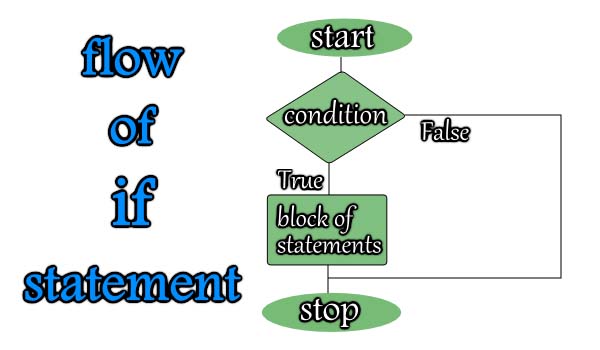
Flow of if statement in C Language

Flow of if statement

Syntex :
if(condition)
{
 statements;  /∗ statements will execute if the condition is true ∗/
}
Example :
#include<stdio.h>
#include<conio.h>
int main()
{
int a=10;
if(a==10)
{
 printf("First if block \n"); 
}
if(a>20)
{
 printf("Second if block \n"); 
}
if(a<20)
{
 printf("Third if block \n"); 
}
getch();
return 0;    
}
Output
First if block
Third if block 
In above program an integer variable is a is initilized to 10.then in first if block condition is a==10 that is true and it returns 1 and a non zero value in if considered true and statements in this block executed and it printf "First if block". in next if statement a>20 condition is tested that is false and returns 0 to if and second if block is not executed. in third if block a<20 condition is tested that is true and returns 1 so block executed. 
Operators in C Language

Operators in C Language

operators in c language
Operators are the symbol which operates on value or a variable. C language is rich in built-in operators and provides the following types of operators - 
  • Arithmetic Operators
  • Relational Operators
  • Logical Operators
  • Bitwise Operators
  • Assignment Operators
  • Other Operators

Arithmetic Operators

OperatorDescription
+Addition
-Subtraction
Multiplication
/Division
%Modulus/Remainder

Relational Operators

OperatorDescriptionExampleMeaning
>Greater thanx>yx is greater than y
<Less thanx<yx is less than y
>=Multiplicationx>=yx is greater than or equal to y
<=Divisionx<=yx is less than or equal to y
==Modulus/Remainderx==yx is equal to y
!=Modulus/Remainderx!=yx is not equal to y
  • Relational Operators are used to compare two numbers
  • if in a comparasion the condition is true then it returns 1.
  • if given condition is false then it returns 0.

Logical Operators

OperatorDescription
&&Logical AND
||Logical OR
!Logical NOT
Logical Operators works on Logic gates. The below table can help to understand how logic gate works in C Language.(False - 0, True - 1)
ABA&&BA||B!A
00001
01011
10010
11110

Bitwise Operators

Bitwise operator works on bits and performs bit-by-bit operation.
OperatorDescription
&Bitwise AND
|Bitwise OR
^Bitwise XOR
~One's complement
>>Right Shift
<<Left Shift

Assignment Operators

OperatorDescriptionExample
=Assigns values from right side operands to left side operandc = a + b, in this statement value of a+b assigned into c
+=Add right operand to the left operand and then assign it to left operanda+=b is same as a=a+b
-=Subtract right operand from the left operand and then assign it to left operanda-=b is same as a=a-b
∗=Multiplies right operand with left operand and then assign it to left operanda∗=b is same as a=a*b;
/=Divides left operand with the right operand and then assign it to left operanda/=b is same as a=a/b
%=Calculate modulus using two operands and then assign it to left operanda%=b is same as a=a%b

Other Operators

OperatorDescriptionExample
sizeof()Returns size of variable.sizeof(i), if i is integer then it will return 4.
&Returns address of variable in memory.&i; will return address of the variable.
*Pointer variable.*i; will declare a pointer variable.
? :Conditional Operator
..
Arithmetic Instruction in C Language

Arithmetic Instruction in C Language

Arithmetic Instructions can be classified in three categories
  • Integer Mode Arithmetic Instruction
  • Real Mode Arithmetic Instruction
  • Mixed Mode Arithmetic Instruction

Integer Mode Arithmetic Instruction

In Integer Mode Arithmetic Instruction all the operands are integer and result is also integer.
int  a,b,div;
a = 21;
b = 2;
div = a/b;
printf("Division = %d",div);

Output

Division = 10
In above program 21 divided by 2 and expected result will be 10.5 but both variable a and b are integers so their output is 10

Real Mode Arithmetic Instruction

In Real Mode Arithmetic Instruction all the operands are real numbers and result is also a real number.
float  a,b,div;
a = 21.0;
b = 2.0;
div = a/b;
printf("Division = %d",div);

Output

Division = 10.500000

Mixed Mode Arithmetic Instruction

In Mixed Mode Arithmetic Instruction some operands are integer and some are real numbers and result is a real number.
int  a;
float  b,div;
a = 21;
b = 2.0;
div = a/b;
printf("Division = %d",div);

Output

Division = 10.500000
How to Get Input using scanf in C Language ?

How to Get Input using scanf in C Language ?

Just like printf() to display output a ready-made function scanf() is also available in C Library to take input from user through keyboard. scanf() function is also defined in a Header file stdio.h so if you want to use scanf function in your program then first you have to include the header file stdio.h in your program.
Scanf in C Language
The general form of scanf() function is,
scanf("format string",list of variables);
  • %d used in format string for an integer.
  • %f used in format string for a real number.
  • %c used in format string for a character.
#include<stdio.h>
#include<conio.h>
int main()
{
int a;
float b;
printf("Enter an Integer = ");
scanf("%d",&a);
printf("Enter a Real number = ");
scanf("%f",&b);
printf("Integer number = %d \n",a);
printf("Real number = %f",b);
getch();
return 0;    
}

Output

Enter an Integer = 35
Enter a Real number = 45.56
Integer number = 35
Real number = 45.560000
In above c program the ampersand(&) is used before variables in scanf() function. & is known as "Address of " operator and it gives address of variable in memory.
  • More than one input can be taken in a single scanf() function.
scanf("%d%d%d",&a,&b,&c);

A Program to subtract two integer number in C

#include<stdio.h>
#include<conio.h>
int main()
{
int  a,b,sub;
printf("Enter First Number = ");
scanf("%d",&a);
printf("Enter Second Number = ");
scanf("%d",&b);
sub = a-b;
printf("Subtraction of %d and %d = %d",a,b,sub);
getch();
return 0;    
}

Output

Enter First Number = 20
Enter Second Number = 5
Subtraction of 20 and 5 = 15
Before going to next chapter you first need to write some programs in c like.
  • To Add two numbers using scanf().
  • To Multiply two numbers using scanf().
  • To Divide two numbers using scanf().
How to Display Output using printf in C Language ?

How to Display Output using printf in C Language ?

In C language to display output on screen ready-made library function printf() is used. printf() function defined in a Header file stdio.h so if you want to use printf function in your program then first you have to include the header file stdio.h in your program.

The general form of printf() function is,
printf("format string",list of variables);
  • %d used in format string to print an integer.
  • %f used in format string to print a real number.
  • %c used in format string to print a character.
#include<stdio.h>
#include<conio.h>
int main()
{
int a = 50;
float b = 120.54;
char c = 'R'; 
printf("Value of a = %d \n",a);
printf("Value of b = %f \n",b);
printf("Value of c = %c ",c);
getch();
return 0;    
}

Output

Value of a = 50
Value of b = 120.540000
Value of c = R
\n in above program is an Escape Sequence that is used to take cursor to the next line. if you remove this then output will display on a single line.
  • printf() can not only print a value of a variable, it can also print the result of an expression and a constant.
printf("%d%d%d",14,12-4+26,i+j);

 A Progaram in C Language to add two integer

#include<stdio.h>
#include<conio.h>
int main()
{
int  a,b,sum;
a = 20;
b = 50;
sum = a+b;
printf("Addition of %d and %d = %d",a,b,sum);
getch();
return 0;    
}

Output

Addition of 20 and 50 = 70
Before going to next chapter you first need to write some programs in c like.
  • To subtract two numbers.
  • To Multiply two numbers.
  • To Divide two numbers.